


Customize the unavailable page
how-to Steps to accomplish one task
On this page
- When the page appears
- Prerequisites
- Replace or turn off the page
- Verify the result
- What this changes
- If something goes wrong
When the ingress controller (HAProxy) cannot reach CluedIn, it shows a “CluedIn is temporarily unavailable” page instead of a bare proxy error. This can happen during an upgrade, while pods restart, or during an outage. This article explains when the page appears and how to replace it or turn it off.
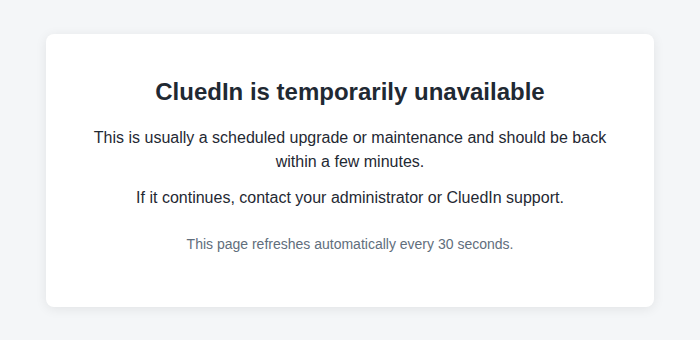
When the page appears
The page is returned with these status codes:
| Status | When HAProxy returns it |
|---|---|
502 Bad Gateway | HAProxy connected to a CluedIn pod, but the pod did not return a valid response. |
503 Service Unavailable | No CluedIn pod is available, for example while a deployment is scaled to zero or restarting. |
504 Gateway Timeout | A CluedIn pod did not respond in time. |
The page only replaces errors that HAProxy generates itself. If CluedIn is running and returns a 5xx error itself, that response reaches the browser unchanged.
The page has no external links, fonts, images or scripts, so it still displays when the rest of the cluster is down. It reloads every 30 seconds, so users get CluedIn back without refreshing manually. It is sent with cache-control: no-store, so browsers don’t keep showing it after CluedIn is back.
Prerequisites
- Access to your Kubernetes cluster with
kubectl. - Helm installed, and the values file used to install CluedIn.
Replace or turn off the page
The page is set in your Helm values, under infrastructure.haproxy-ingress.controller.config. There is one key per status code: http-response-502, http-response-503 and http-response-504. Values in your own values file take precedence over the chart defaults.
- Export your current values file from the environment.
-
Add the keys you want to change. Each key’s value starts with the status line, followed by headers, an empty line and the body:
infrastructure:
  haproxy-ingress:
    controller:
      config:
        # Replace the 503 page with your own
        http-response-503: |
          503 Service Unavailable
          content-type: text/html; charset=utf-8
          cache-control: no-store

          <!DOCTYPE html>
          <html><body><h1>Down for maintenance</h1><p>Contact the service desk on extension 1234.</p></body></html>
        # Turn off the custom 504 page and show HAProxy's default page instead
        http-response-504: ""
When you write your own page:
- Keep it self-contained. Links to external stylesheets, fonts, images or scripts fail too while CluedIn is unavailable.
- Keep the whole response under 16 KB, which is the size of HAProxy’s buffer.
- Don’t include the text
]==]. The ingress controller reserves it and ignores a page that contains it. - Don’t add a
content-lengthheader. The ingress controller calculates it.
- Run
helm upgradewith the updated values.
Verify the result
-
Check the
cluedin-haproxy-ingressconfig map. It should contain your values for thehttp-response-50xkeys:kubectl get configmap cluedin-haproxy-ingress -n cluedin -o yaml -
Check that the ingress controller accepted the configuration. Its logs should show
haproxy successfully reloadedand noALERTlines:kubectl logs deploy/cluedin-haproxy-ingress -n cluedin --since=5mTo confirm what users see, open CluedIn in a browser while it is unavailable, for example during the next upgrade.
What this changes
Only the ingress controller configuration changes: the controller reloads HAProxy with the new pages. CluedIn itself is not restarted. To undo the change, remove the keys from your values file and run helm upgrade again. This restores the CluedIn page shipped with the chart.
If something goes wrong
- The logs show
ignoring 'http-response-503' due to a malformed response. The value isn’t in the expected format. Check that the first line is a status line or a header, that every header line has a colon, and that an empty line separates the headers from the body. - The logs show
payload size does not match the announced content-length. HAProxy rejected the configuration. Check that you’re using the ingress controller’s response template that ships with the CluedIn chart. That template is mounted into the controller from thecluedin-haproxy-ingress-response-templateconfig map. Without it, the controller image calculates the size of a custom page incorrectly.